Seedream 5.5 is ByteDance's current Seedream image model, run here through WaveSpeed. It generates stills from text and edits up to ten reference images at 1K, 1.5K or 2K, and can return a native transparent-background PNG. On MiniMax H3 it is the image route for building a clean start frame or product still before you move to image-to-video.
Decision guide
When to choose this route
Use Seedream 5.5 when you need a photoreal still, a product shot, or a transparent cut-out. Use Seedream 5.5 Edit when you have one to ten references. When the still is right, download it and upload it as the start frame of a MiniMax H3 image-to-video run. Every run shows its credit quote first.
Specification notes
Capabilities stay tied to what the live endpoint can do in this workspace.
Text to image
Describe subject, setting, light, and any exact words in quotation marks. Choose 1K, 1.5K or 2K.
Native transparent PNG
Set Background to Transparent PNG, or choose the locked Transparent PNG preset, for cut-outs and logos.
Reference editing
Seedream 5.5 Edit accepts up to ten images. Additional references raise the credit quote.
Start frames for video
Compose the opening frame as a still first, then animate it with MiniMax H3 image-to-video.
Seedream 5.5 prompt examples
Each example pairs a visual reference with a copyable production brief. Replace subjects while keeping hierarchy, light, and materials concrete.
Lisbon cafe
A photoreal establishing still you can upload as a start frame.
A cozy street-side cafe in Lisbon at golden hour, a barista handing a cup of coffee across the counter, warm natural light, blue azulejo tiles, a chalkboard menu written in English, photorealistic, shot on 35mm
Festival poster
Quote every word that must appear in the image.
A summer music festival poster: bold headline text "SUNSET SOUNDS 2026", a stylized orange sun over palm trees, a guitar silhouette, small line-up text at the bottom, flat graphic design, vibrant colors
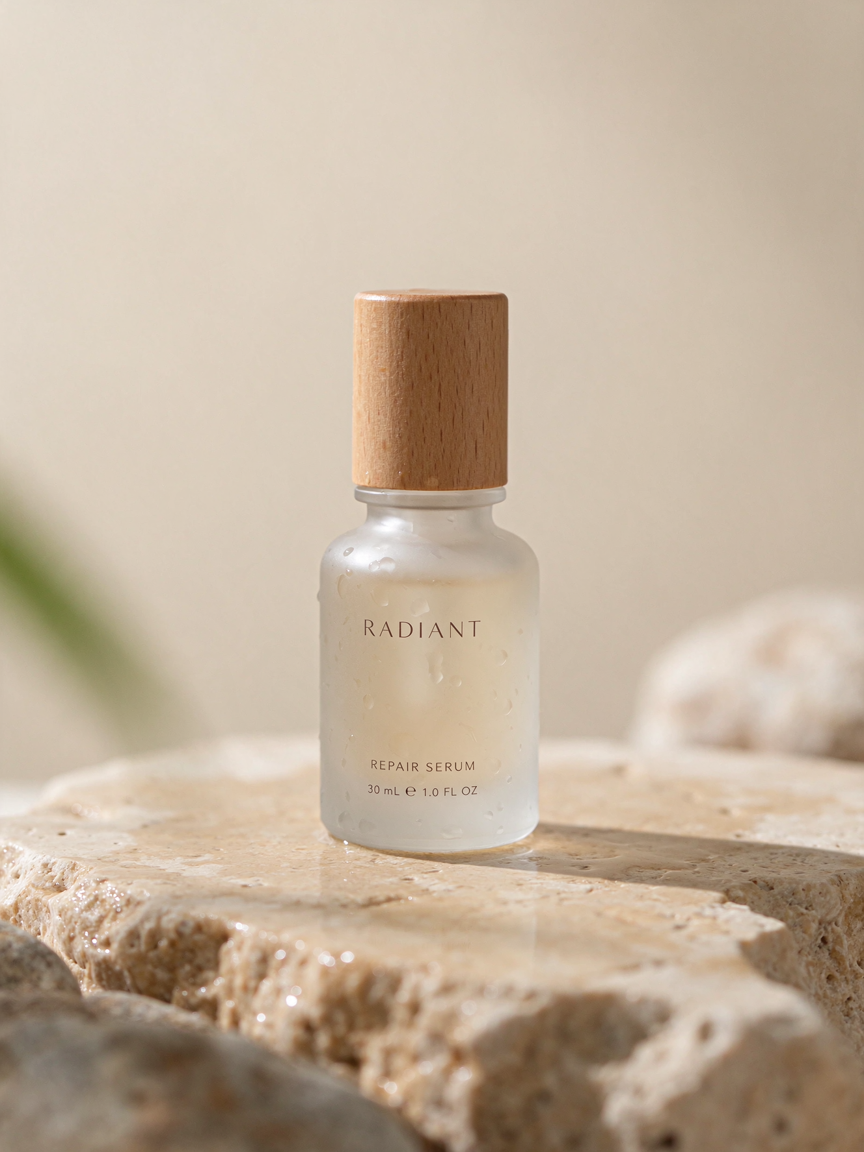
Serum bottle
A clean product still for an image-to-video opening shot.
A minimalist skincare product shot: a frosted glass serum bottle with a wooden cap on a wet travertine stone, soft morning light, water droplets, shallow depth of field, clean beige background, commercial photography
Bakery window
A print-style layout with a headline and price.
A French bakery window poster with the headline "Pain au chocolat — 2,50 €" in elegant serif lettering, a small line "Fait maison chaque matin", a photo of fresh croissants below, warm cream background, print design
A controlled video workflow
Small, intentional changes produce more learning than rewriting every part of the prompt.
01
Compose the still
Write subject, setting, light, and exact text, and test at 1K.
02
Refine with references
Switch to Seedream 5.5 Edit and list what must stay unchanged.
03
Animate it
Download the final still and upload it as the start frame in MiniMax H3 image-to-video.
Workspace facts
Live constraints for Seedream 5.5 on this route: endpoints, credit math, and provider pricing sources you can verify before generating.
Live endpoints on this page
Seedream 5.5 opens through 3 linked endpoints in the MiniMax H3 generator: bytedance/seedream/v5.5/text-to-image; bytedance/seedream/v5.5/edit; bytedance/seedream/v5.5/text-to-image/transparent. Available modes here: text to image, image to image. Shared aspect ratios: 16:9, 9:16, 1:1, 4:3, 3:4, 21:9.
Credit cost in this workspace
A typical 1:1 text-to-image run with Seedream 5.5 costs 6 credits here. Image-to-image with one reference is 8 credits on bytedance/seedream/v5.5/edit.
Compared with the MiniMax H3 default
Home default remains H3 Max Turbo · Text to Video. This page locks Seedream 5.5 for a controlled comparison in the same prompt box and credit estimator.
Related model pages
Stay inside the same workspace while comparing nearby model intents.
Yes. Seedream 5.5 text-to-image, the Transparent PNG preset, and Seedream 5.5 Edit run live through WaveSpeed, and the exact credit quote is shown before each request.
Does Seedream 5.5 output a transparent PNG?+
Yes. Set Background to Transparent PNG, or choose the locked Transparent PNG preset. Inspect the alpha channel before publishing.
Can I turn a Seedream 5.5 still into a video?+
Yes. Download the still and upload it as the start frame of a MiniMax H3 image-to-video generation.